
“Chat Sessions”, “Messages” and then “Copilot Credits”, Copilot Studio licensing has gone through a few iterations already. Let’s summarize the different options available, when each makes sense, how to report and monitor consumption, and what options exist (or don’t) for controlling costs.
This article is part of the Copilot Studio Governance series. The master article covers the full governance landscape: monitoring, restrictions, DLP, sharing controls, and tenant-level configuration. This post focuses specifically on licensing.
On this page
Different Copilot Studio Licensing Options
User License and Copilot Credits
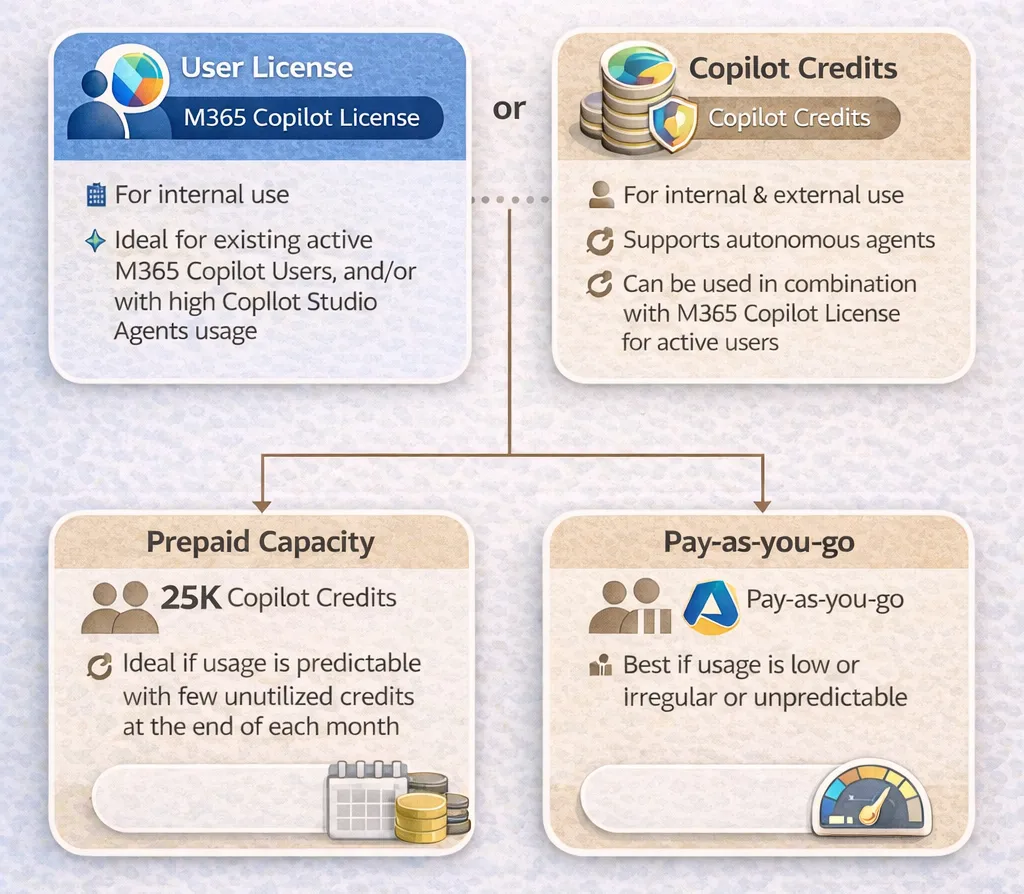
It is the usage of Copilot Studio Agents, and not their creation, which requires paid licensing. There are 2 main approaches to Copilot Studio licensing:
-
User license: users with a M365 Copilot license can use Copilot Studio Agent capabilities when used in Microsoft 365 Copilot, Teams, or SharePoint
-
Copilot credits: they are consumed when an agent is used autonomously or by non-licensed user. Here again, there are two main options to manage these credits:
-
Pre-paid capacity: pack of 25,000 Copilot Credits / month for about 200$ / month. These credits can be assigned to environments or agents to reserve the capacity for specific use cases, or remain in a shared pool.
-
Pay-as-you-go: association of an Azure Subscription with an Environment to charge 0.01$ / Copilot credit consumed.
-
Picking the Best Licensing Option for Copilot Studio
So, when to choose which? As for most things in life, it depends. Most of the time, a combination of approaches makes sense:
-
Users who already have a M365 Copilot license are already licensed, no question for them. For the others, the M365 Copilot license makes sense if they plan on using M365 Copilot features or if they have a very high usage of Copilot Studio Agents.
-
Using Pay-as-you-go makes the most sense for low or unpredictable, irregular usage. This is typically a model which works great for the launch of an agent.
-
As the consumption stabilizes in time, transitioning to a pre-paid capacity model can help make additional savings. It is also a good way to enforce a certain limit of consumption (not always… See the note below) which cannot be done with Pay-as-you-go.
⚠️Note on Pay-as-you-go: Pay-as-you-go cannot be enabled without the Dataverse meter. This is good to keep in mind when setting it up to avoid bad surprises with costs. As rightly suggested by Jukka Niiranen, even with this meter turned on, it is still possible to allocate storage capacity addons to the environment and avoid paying the pay-as-you-go price for storage. If the capacity is not allocated directly, the environment can be configured to draw the capacity available from the tenant.
⚠️Note on Prepaid capacity packs: credit allocation cannot always be used as a consumption cap. If the current and actual consumption exceeds the amount you try to allocate, the Power Platform Admin Center (PPAC) will return an error and block the allocation, not the consumption. Microsoft has confirmed this is the expected behavior, justified by “operational continuity”. This is worth keeping in mind when planning capacity: unlike AI Builder (where capping was previously possible), you cannot use credit allocation as a hard budget ceiling for Copilot Studio if the current and actual usage is already high.
Clarification on the License Requirements for Makers
I said earlier that it is “the usage of Copilot Studio Agents, and not their creation, which requires paid licensing”. This statement is not always true. Beyond the appropriate security role to create agents in an environment the Maker also need one of the below conditions to be met:
-
Have an appropriate license, or…
-
Be added to a security group configured for the “Copilot Studio Author” tenant setting in the Power Platform Admin Center.
The appropriate license can be one of the below options:
-
The M365 Copilot License
-
The Copilot Studio User License: This license is free and is only used to license the Makers to create agents. This license is only provisioned when Copilot Credits are purchased and provisioned in the tenant.
-
The Copilot Studio Viral Trial License: This license is only available if self-service sign-up is turned on for the tenant.
Coming back to my initial statement, companies do not need to pay license any fees for Makers to create agents since they can simply use the Copilot Studio Author security group, or use the Copilot Studio User license (provided that they have paid for at least 1 capacity pack) which is free. But holders of a M365 Copilot license, which has to be paid for, can also create agents.
Note on Managed Environments
Managed Environments are an area of heavy investment from Microsoft to increase governance capabilities. By making an Environment “Managed”, you benefit from additional governance features, such as the ability to restrict sharing and use Power Platform Pipelines. These governance capabilities are great and come at a cost: every App and Flow created on the environment is considered premium, regardless of the connectors used. These licensing implications can be a blocker for many large organizations.
Now the good news with Copilot Studio is… That Managed Environments have no impact on costs. Managed Environment or not, the credit consumption will behave in the same way, regardless of the chosen licensing approach (pay-as-you-go prepaid capacity). For large organizations with still a low amount of premium licenses, it can make sense to define that Copilot Studio Agents are only created in Managed Environments, and segregate Copilot Studio Agents and Power Apps Apps in different environments.
Planning Copilot Credits Needs
Planning the consumption of an agent before it is released in Production is not an easy task. The number of credits consumed for one interaction depends on the features used by the agent, as documented here. Microsoft released the Agent Usage Estimator to support organizations with the planning, definitely worth a look.
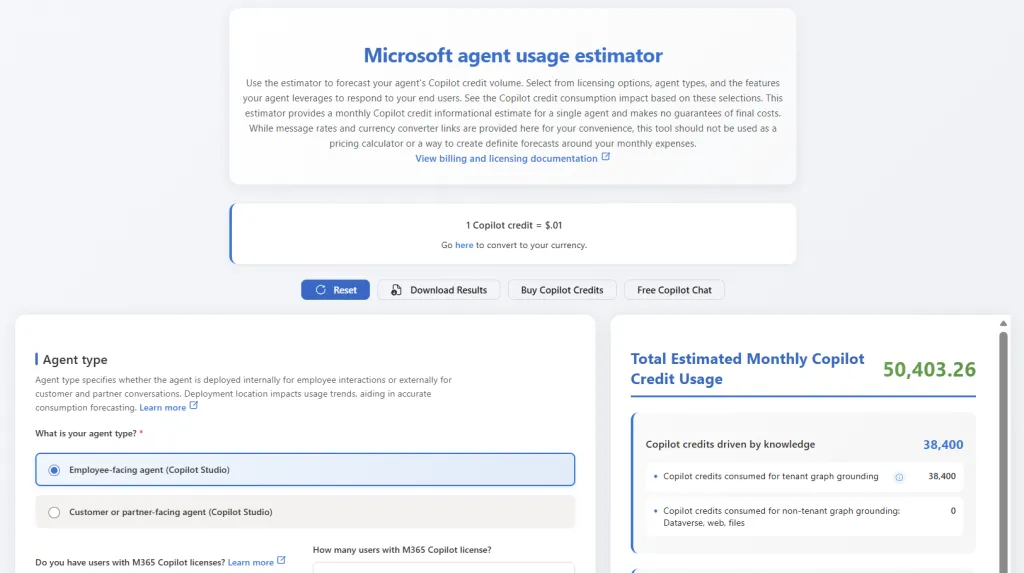
This calculator is based on the billing rates communicated by Microsoft.
Monitoring Copilot Credits Consumption
The Agent is now live, how can we measure its actual consumption?
The PPAC has a dedicated page to review Copilot Studio consumption. It shows consumption per environment, per agent and even per feature. Csv reports can be downloaded manually from the PPAC to build custom reports. These reports have recently changed. They used to only include a tenant summary report which showed the consumption per environment day, and individual environment reports which had to be downloaded separately to have the detail per agent in each environment. Now these reports cover:
-
Environment Consumption Summary report: credits consumed per environment. This report is a great tool to assess the best option between prepaid capacity and the pay-as-you-go model.
-
Agent-Level Credit Consumption Report: one single report showing the detailed consumption per day per agent and per feature across all environments. It is the combination of all the individual reports which had to be downloaded separately before.
-
User-Level Credit Consumption Report: this is a brand new report, particularly handy. It shows the credit consumption per user and also indicates whether they have a M365 Copilot license assigned. This is useful for identifying users whose consumption level would justify switching to an M365 Copilot license.
To automate the download and reporting of consumption data, I built and share the PPAC Reports Extractor. It is a Power Automate-based solution that retrieves Copilot Studio usage reports for Copilot Studio, AI Builder, API Calls, and Power Pages. Note: the Copilot Studio message report API changed in Q1 2026, temporarily breaking this automation. As of May 2026, the PPAC Reports Extractor has been updated to use a new endpoint. Each daily extract now covers 6 months of rolling data. The Copilot Studio Kit was also affected; check their release notes for their status.
Controlling Credit Consumption
Organizations often ask how to cap consumption to avoid unexpected costs. Unfortunately, no bulletproof answer exists today.
As noted earlier, Environment-level allocation doesn’t cap consumption. Credit allocation in the PPAC assigns capacity to an environment but does not enforce a ceiling. If actual consumption exceeds the amount to be allocated, PPAC blocks the allocation change, not the consumption itself. Microsoft has confirmed this is by design to preserve “operational continuity.” In practice, allocation is a planning tool, not a budget control.
Agent-level limits exist but don’t scale. Individual agents can be configured with credit limits. This works for known, existing agents. The problem is that new agents created in the environment don’t inherit any default limit. Without additional automation, every new agent starts with unlimited consumption potential.
Custom enforcement is possible but unsupported. The underlying API for setting agent-level limits is not publicly documented. It’s technically possible to build automation that applies default limits to newly created agents, but this approach carries risk: undocumented APIs can change without notice, and Microsoft support won’t help if something breaks.
Today, there is no supported, scalable way to enforce hard consumption limits across Copilot Studio. Environment-level allocation can act as a cap if set early, but cannot be reduced once consumption exceeds it. Agent-level limits remain a useful control for existing agents, but cannot be set preventively for agents that don’t yet exist. Organizations should monitor agent consumption closely and treat these mechanisms as budgeting tools rather than guaranteed safeguards.
Conclusion on Copilot Studio Licensing
As always with licensing, it is not a one-size-fits-all decision. The right model depends on who is using the agent, how predictable their usage is, and how much control is needed over cost. Licensing is one part of the broader Copilot Studio governance picture. For the full reference covering monitoring, DLP, restrictions, sharing controls, and tenant settings, see Copilot Studio Governance: The Complete Admin Reference.
A practical starting point for most organizations is to use M365 Copilot licenses where users already have them, start new agent rollouts on pay-as-you-go to baseline actual consumption, then migrate to prepaid capacity once usage stabilizes and the savings justify it. Regardless of the followed approach, leveraging Managed Environments for Copilot Studio provides additional governance capabilities with no impact on costs, provided that there aren’t any standard Power Apps Canvas Apps in the same environment.
Two limitations are worth keeping in mind. First, there’s no supported way to enforce hard consumption limits at scale. Environment allocation works only if set early, and agent-level limits don’t apply to newly created agents. Second, automated consumption reporting via Power Automate was temporarily disrupted by a Copilot Studio-specific API change in Q1 2026. As of May 2026, the PPAC Reports Extractor has been updated to use a new endpoint covering 6 months of rolling data per extract. The PPAC reports themselves have also improved significantly for direct monitoring needs.
Newsletter
Stay in the loop
Get notified when I publish new articles on Power Platform Governance.

About Valentin Mazhar
Microsoft MVP and certified Solution Architect specializing in enterprise Power Platform governance, AI enablement, and operating models. With 5+ years delivering governance programs in regulated environments, Valentin helps organizations scale low-code and AI securely, building the foundations that let makers and agents thrive without compromising control.


